Scripts & Script Handles
Scripts
Unlike Roblox's implementation, scripts are not separate Instances. In Luduvo, scripts are attached to Instances. You can only have one script per Instance. This is independent of the script type; you can only have a Client or a Server script per Instance.
When making a script, Luduvo allows you to choose where it will run. By clicking on an Instance in Luduvo's Outliner, you can select whether it will run on the client or the server.
- Client Script: Runs on the client (player) side.
- Server Script: Runs on the server (shared) side.
The loader recognizes these filename suffixes:
| Suffix | Known behavior |
|---|---|
.client.lua |
Runs as client code. |
.server.lua |
Explicit server suffix. |
.lua |
Used by Luduvo's built-in server scripts. Unsure if used anywhere else. |
Studio currently presents one attached script slot for an Instance. The native evidence does not establish whether every loader path enforces that as a universal one-script limit.
Within scripts, the self global points to the Instance that the script is attached to. This is the equivalent of using script.Parent in Roblox.
Script Handles
Script Handles allow you to set references to other Instances via the Properties panel in Luduvo Studio.
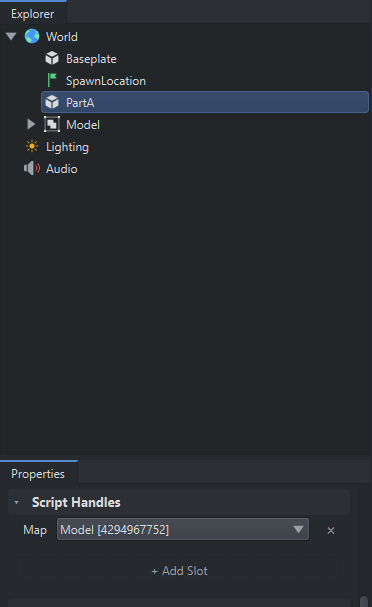
The example shows adding a Script Handle named Map onto PartA. The reference is set to the Model model in the world. These can then be accessed via the handles global inside of scripts.
In this example, inside a script attached to PartA:
- This line would output "Model".